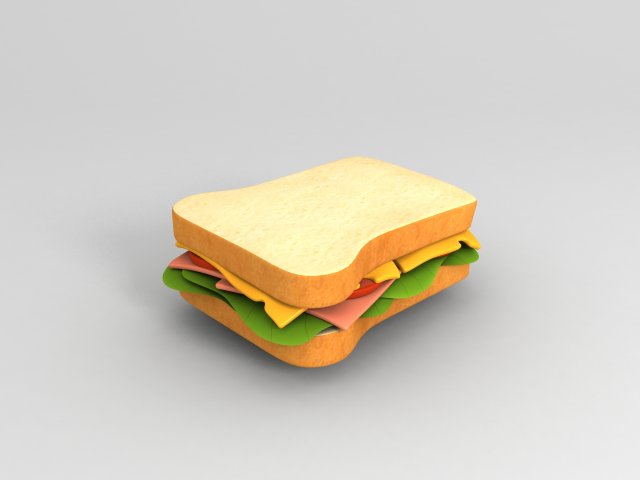
Sandwich 3d model in cartoon style.Created from 3ds max 2014.Preview images are rendered in Vray..max 2014.FBX.OBJ.stl4096x4096 JPG textures———————-2,318 poly2,294 vertIn subdivision Level 0———————-36,392 poly36,572 vertIn subdivision Level 2———————-
Tag: ham
-
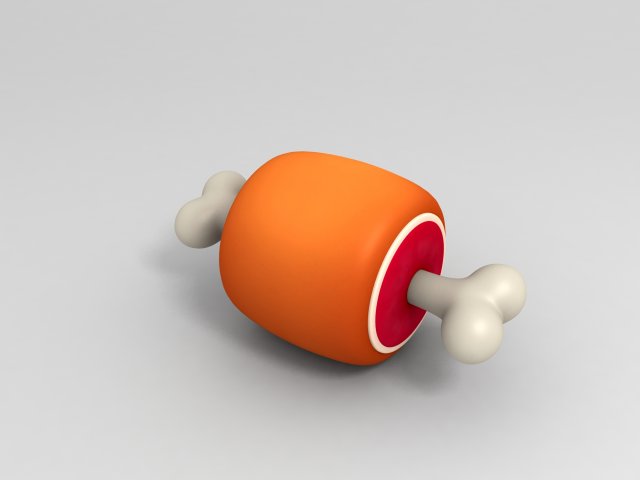
Cartoon Ham 3D Model
Ham 3d model in cartoon style.Preview images are rendered in Vray..max 2014.FBX.OBJ2048x2048 JPG textures———————-752 poly832 vertIn subdivision Level 0
-
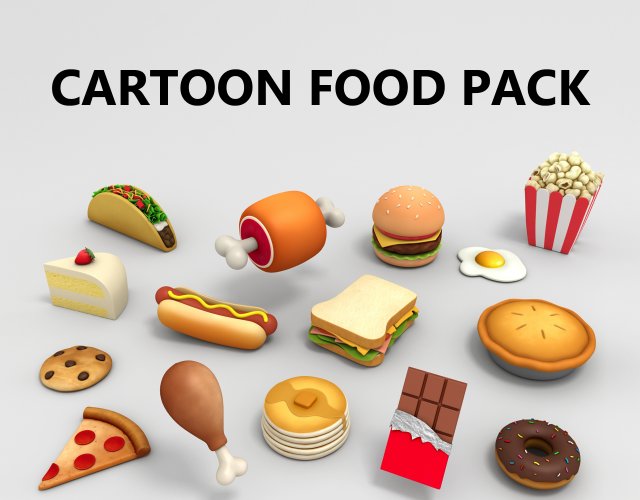
Cartoon Food Pack 3D Model
Cartoon Food Pack 3d models in cartoon style.Preview images are rendered in Vray.This pack contains 15 foods.Chicken Leg [328 poly]Popcorn [8,901 poly]Pizza [693 poly]Pancake [1,649 poly]Ham [752 poly]Hotdog [1,312 poly]Fried Egg [608 poly]Donut [2,166 poly]Cookie [1,156 poly]Chocolate [1,707 poly]Cake [777 poly]Burger [3,890 poly]Sandwich [2,318 poly]Taco [14,116 poly]Pie [434 poly]Formats.max 2014.FBX.OBJ2048x2048 JPG textures
-
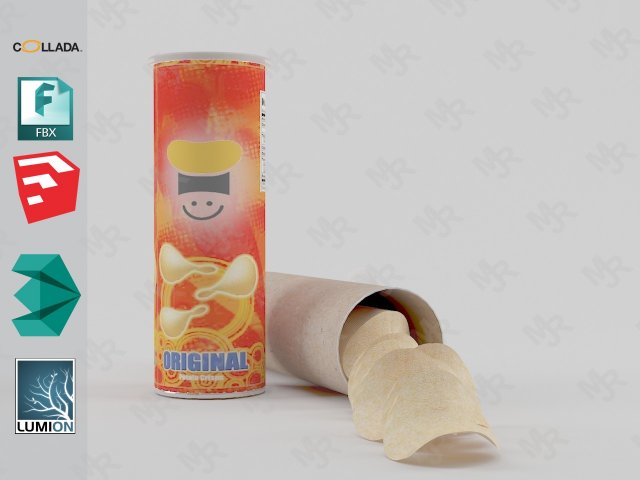
Potato Chips 3D Model
Potato Chips 3D modelPotato Chips 3D model with labelPotato Chips 3D model ready for Virtual Reality (VR), Augmented Reality (AR), games, Postproduction, Photomanipulation and other real-time apps.Potato Chips 3D model with label!Materials in 3DS Max & Sketchup included.Models already preloaded in lumion 6, just copy and paste on your computer or import it from the included scene.Textured Label image file included!!!——————————Polygons: 70,768Vertices: 84,526—————————File formats:- 3dmax 2013 – Vray 3.40- OBJ- FBX- DAE- 3DS-Sketchup 2013-Lumion 6 (as “.x DirectX” Format)——————————-Enjoy!
-

Frozen Chicken Part Meat Butchers Goods 3D Model
The count per one frozen chicken part is: 3084 polygons and 3082 vertices.V-Ray and standard materials- Hi-Res Realistic product- Correct scale- Object(s) in their own layer (name via product name)Maps in max archives :Diffuse 4096*4096px JPGNormals 2048*2048px TIF32 bit Displacement 2048*2048px exr16 bit Displacement 2048*2048px TIFThese are optimized and are indistinguishable from 8192*8192px TIFFs (which take more RAM during rendering etc.)Nevertheless if you want 105% quality, you can download the separate hires TIFF textures archive (around 250MB), which contains:Diffuse 8192*8192px TIFNormal 4096*4096px TIFDisplacement 32bit 4096*4096px EXRIf you need just the original mesh without using displacement map during rendering, take the low poly version, subdivide it a couple of times and use the displacement map in ‘displace’ modifier (in 3ds max) or similiar in other applications, which will deform your mesh in viewport realtime, so you get the original hipoly mesh. You can use it, or use it as proxy or decimated it etc.Objects are in their own layer called ‘_Merged_Buyed’. No part-name confusion when importing. Centered on 0,0,0.
-

Sausages Realistic Pile Set 3D Model
The count per one apricot is: 237 polygons and 239 vertices.V-Ray and standard materials- Hi-Res Realistic product- Correct scale- Object(s) in their own layer (name via product name)Maps in max archives :Diffuse 4096*4096px JPGNormals 2048*2048px TIF32 bit Displacement 2048*2048px exr16 bit Displacement 2048*2048px TIFThese are optimized and are indistinguishable from 8192*8192px TIFFs (which take more RAM during rendering etc.)Nevertheless if you want 105% quality, you can download the separate hires TIFF textures archive (around 250MB), which contains:Diffuse 8192*8192px TIFNormal 4096*4096px TIFDisplacement 32bit 4096*4096px EXRIf you need just the original mesh without using displacement map during rendering, take the low poly version, subdivide it a couple of times and use the displacement map in ‘displace’ modifier (in 3ds max) or similiar in other applications, which will deform your mesh in viewport realtime, so you get the original hipoly mesh. You can use it, or use it as proxy or decimated it etc.Objects are in their own layer called ‘_Merged_Buyed’. No part-name confusion when importing. Centered on 0,0,0.
-

Cartoony Food Items 3D Model
A collection of food items in a cartoony style. Perfect for pickups in video games, props in your movie or just to spice up your render (or when you crave something good to eat)The collection has 10 products in total, all unwrapped with non overlapping UVS and comes with both a high res and a low res texture (2048×2048 and 512×512 in the .png format)The 3ds max file contains all items in a single scene, while the zip files contain each item as a seperate fbx and obj file.Also included is a unitypackage ready to be imported.All renders are made with the scanline renderer and a singe skylight.Made in 3ds max.
-

3D model Slice of Brawn Realistic 3D Model
V-Ray and standard materials- Hi-Res Realistic product- Correct scale- Object(s) in their own layer (name via product name)Maps in max archives :Diffuse 4096*4096px JPGNormals 2048*2048px TIF32 bit Displacement 2048*2048px exr16 bit Displacement 2048*2048px TIFThese are optimized and are indistinguishable from 8192*8192px TIFFs (which take more RAM during rendering etc.)Nevertheless if you want 105% quality, you can download the separate hires TIFF textures archive (around 250MB), which contains:Diffuse 8192*8192px TIFNormal 4096*4096px TIFDisplacement 16bit 4096*4096px TIFDisplacement 32bit 4096*4096px EXRIf you need just the original mesh without using displacement map during rendering, take the low poly version, subdivide it a couple of times and use the displacement map in ‘displace’ modifier (in 3ds max) or similiar in other applications, which will deform your mesh in viewport realtime, so you get the original hipoly mesh. You can use it, or use it as proxy or decimated it etc.Objects are in their own layer called ‘_Merged_Buyed’. No part-name confusion when importing. Centered on 0,0,0.