Summary
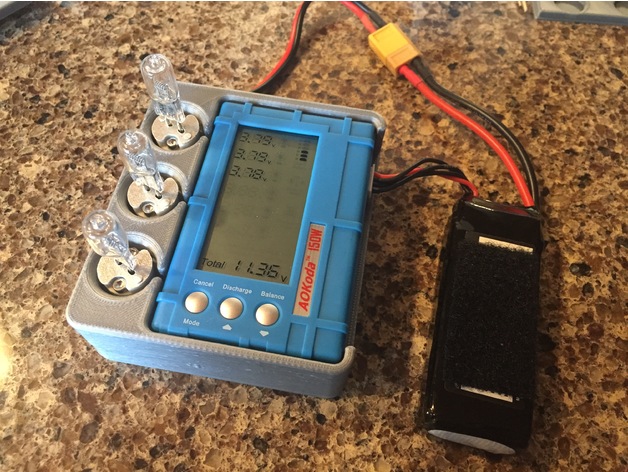
Housing for the 150W lipo discharger that many RC guys are using. Has a press fit compartment for the actual controller and holders for the three light bulbs fixtures. The light bulb controller and all wires are located underneath the controller. There is also a storage compartment with a slide out cover to hold the battery cable and the three light bulbs when not in use. The unit ships with a Deans style T connector and I purchase a 9″ long XT-60 adapter cable and it is about the perfect length to be able to store and still easily reach the battery balance connector location when in use.
Hardware Required
Qty 18 x 4-40 Socket Head Cap Screws 0.500 long. (6 for bulbs holders & 12 for cover)
Qty 6 x 4-40 hex nuts (for light bulb holders)
The 12 screws for the cover can be shorter (I wouldn’t go less than 0.250 long) but the design will accommodate up to 0.500 long.
The threads for the bottom cover are designed into the part, but the screws will end up cutting the plastic a bit on first installation. I find it best to go slow with the screws about 1 turn at a time and then allow the screw to cool before continuing. When turned continuously the screws will get hot enough to melt PLA and ABS and destroy the threads.
I printed in PLA and have successfully discharged a 1500mah 4S battery from 16.8v to 14.8v without any overheating of the plastic parts (all 3 bulbs were on). However the bulbs get VERY HOT, DO NOT LEAVE UNATTENDED. I have not tested higher voltages than 4S.
Design files are included for easy modifications, Print Files are high resolution and do not always render on the thingiverse server.
Discharger amazon (the one in the pictures)https://www.amazon.com/Targethobby-Discharger-Voltage-Balancer-Battery/dp/B01ET33R5S/ref=sr_1_2?ie=UTF8&qid=1504837626&sr=8-2&keywords=150w+lipo+discharger
9″ Deans to XT-60 Cable Amazon (the one in the pictures)https://www.amazon.com/gp/product/B016AN4T8O/ref=oh_aui_detailpage_o01_s00?ie=UTF8&psc=1
Discharger Banggoodhttps://www.banggood.com/AOK-3-in-1-150W-Discharger-Voltage-Tester-Balancer-For-Lipo-Battery-p-1051214.html?rmmds=search
XT-60 Cable Banggood, A little shorter then I would recommendhttps://www.banggood.com/150mm-XT60-Female-Plug-To-T-Male-Plug-Adapter-Connector-p-1137559.html?rmmds=search
Print Settings
Printer Brand:
Prusa Printer:
i3 MK2S Rafts:
No Supports:
Yes Resolution:
.35 Fast default setting with support Infill:
20-25% Notes:
Make sure your slicer is not generating supports for the 12 threaded holes, it will be almost impossible to remove the support material from the threaded holes.
Print in the orientation shown in pictures 3, 4 & 5
How I Designed This
Designed in Alibre Design, Exported to Fusion 360 to add threads, Exported as .stl for printing.
Tag: Discharger
-
3 in 1 150W Discharger Voltage Tester Balancer For Lipo Battery 3D Print Model